Ging!

This evening at the GeekDinner someone pointed out that I haven’t blogged about my cat, and best of all, they weren’t being sarcastic.

So for everyone who’s not following me on twitter, here goes.

just over a month ago someone posted an email to the community mailing list saying that they had rescued a kitten from the train station and asking if anyone had lost it. The cat would end up at an animal shelter if no owner was found and that just wasn’t an option so I mailed the woman and told her that I would take the kitten if nobody had claimed it after a few days.

A few days later we got Ging.

Ging likes to eat.
Ging likes to eat.

Ging is the most precocious cat in the world. She’s tiny but is fearless and wants to explore everything.

Ging is always ready to pounce.

But Ging is also a lover.

Ging loves things that are tasty.

But never, EVER, turn your back.

Because the Ging will get you!

Ging sits on my lap while I work and lies on my chest while I watch TV. It’s all incredibly cutesy, but I must admit that I’m totally sold on cats now. Dogs are still awesome, but in a very very different way.

As usual you can see more of my photos on my flickr site at http://www.flickr.com/photos/arbitraryuser/

Quick and Simple Server SMTP

I have a number of servers that I look after in various places on the intertubes. I like to have things like MDADM (Linux software RAID manager) be able to mail me when the something goes wrong like a disk dies etc.

Some of these machines are in places without reliable SMTP servers for me to send mail through and I’ve tried running my own postfix and delivering the mail directly, but invariably I run into situations where the servers that I’m trying to deliver mail to don’t like DSL IPs… and not getting a mail about a dead disk is kinda a big issue.

I also don’t trust a lot of ISP’s SMTP, and some of my servers move around, so one day it’ll be behind a DSL IP and the next behind a Verizon IP (where it can’t talk to smtp.dslprovider.net etc).

My solution is quite simple, use google. (This guide is for Ubuntu but I’m sure you’ll figure it out with other distros)

  1. Create a gmail account for monitoring. I do this because I don’t want my gmail password floating around in plaintext on various machines.
  2. Install the ca-certificates package

    $ sudo aptitude install ca-certificates
    $ sudo update-ca-certificates

  3. Install msmtp

    $ sudo apt-get install msmtp

  4. Configure msmtp

    $ sudo vim /etc/msmtprc

    Set it to something like

    account gmail
    host smtp.gmail.com
    from myemailaddress@gmail.com
    auth on
    tls on
    tls_trust_file /etc/ssl/certs/ca-certificates.crt
    user notifyemailaddress@gmail.com
    password mys3cr3tp455w0rd
    port 587

    account default : gmail

  5. Create a sendmail simlink

    $ sudo ln -s /usr/bin/msmtp /usr/sbin/sendmail

  6. Run a test

    $ echo “This is a an awesome test email” | msmtp youremail@domain.com

  7. If you want mdadm to mail you when something goes wrong

    $ sudo vim /etc/mdadm/mdadm.conf

    and put your email address on the line that reads something like

    MAILADDR youremail@domain.com

  8. And then run a mdadm test by running

    $ sudo mdadm –monitor –scan –test –oneshot

  9. If everything is working according to plan you should receive an email. You can now rest assured that any future MDADM issues will get to you.

You can keep Mr Huntley

Part of me wants to write a scathing commentary on how much of a tonsil I think Brandon Huntley is, but there’s no point in beating a dead horse so I’ll just say it once. Brandon Huntley is an a-grade, raging, super massive ass hole. There, I’m done.

Canada is a lovely country, it’s so lovely it gets boring. When I was living there they had a shooting in Alberta. For two days the news covered this shooting, which is entirely reasonable until you found out that nobody actually died; in fact nobody was even hurt… actually, nobody was even shot at… it was just a guy shooting his gun into the air to show how much of a man he was. For two days they covered something that probably happens on an almost hourly basis in the Cape Flats. When a Canadian says their car was hijacked they actually mean it was stolen…. when they weren’t around, stolen… because in Canada the idea of someone actually forcing you out of your own car at gunpoint is just too far fetched for them to comprehend. Keep that in mind.

Canadians are also lovely people, they are friendly and helpful. I didn’t meet any racist Canadians while I lived there, but I also didn’t meet many black people. Canada has a much better reputation for “knowing about other countries” than the Americans, but the truth is that a lot of them, while *knowing* full well that we have cities and suburbs etc, still have a very romanticised, sleeping in tents in the bush with the lions roaring in the distance, idea of South Africa.

In contrast, South Africa is a pretty scary place at times. We have levels of crime that are unbelievable. Babies getting raped, people getting shot for the cars etc, just insane… and it’s published internationally.

Enter Brandon Huntley. He went to De Villier’s Graaf High School in Villiersdorp, an Afrikaans boarding school about 100km outside of Cape Town. This is a school for kids who had been expelled from other schools or wanted to get as far away from their parents as possible, a school where the machismo and racism run side by side. The boys are tough; disputes are resolved in fist fights where the loser can walk away covered in blood, and the winner, a hero. Kids go through initiations that involve being caned repeatedly for no reason. The idea that any boy who attended De Villiers Graaf High School could end up as the repeated victim of racially motivated attacks is very very hard to believe. And I should know; I went to school with Brandon Huntley… I only stayed for a year. He was 1 year ahead of me.

I don’t remember Brandon clearly but his face seems familiar and based on what people who knew him better have said about him, he fits very neatly into a stereotype that existed in the school. Hard, tough and mean. He did martial arts and played rugby.

Brandon claims that he was attacked multiple times, by black people, who attacked him because he was white. To put this in context, I have never been attacked by a black person. I know a few people who have been mugged by black people, but they knew, just as their attacker knew, that the attack wasn’t motivated by the colour of their skin, but merely because they had stuff worth stealing. When Lucky Dube’s attacker pulled the trigger it was because Lucky was driving a luxury vehicle… No other reasons, No racism needed.

Brandon claims to have scars on his body from all the times he was stabbed by black people who were attacking him because he was white. I find it so incredibly far fetched that a tough white kid who went to the school he did, and subsequently lived in the suburbs he lived in, ever got attacked by anyone… without provocation. I think that it’s far more believable that Brandon went around looking for shit, picking fights with people in night clubs and occasionally came off second best.

There are really two issues here.

1. Brandon lied in order to stay in Canada. There are some unforgivable lies. Lying about being the victim of racially based attacks in South Africa is one of them. Brandon has perverted the most painful element of South Africa’s history to his advantage and in doing so has brought about a world of pain for himself. I’m sure he never thought that we would find out what he’d said, but now he has made himself unwelcome in two countries… one of them being the country of his birth. We legally have to take him back… pity.

2. The Canadian authorities believed his lies. The individual who processed Brandon’s application is definitely a racist. Brandon’s story seems unbelievable, even to most Canadians. To be in a position within government responsible for dealing with foreigners on a daily makes this official’s ignorance unbelievable… ie. I don’t believe that he really believed Brandon, I think he just wanted to help Brandon get away from the savage and vengeful blacks that both believed in. The part of this story that is so incredibly sad to me is this: The officer responsible for approving Brandon’s racist lies is also responsible for approving, or denying, the refugee applications from countries like Darfur. What chance do honest, petrified human beings, whose families have been slaughtered and who happen to be black, have of gaining asylum when being interviewed by a man like that?


Coffee Filters and Frickin Laser Beams!

I’m always amazed at how difficult it is to get some businesses to actually sell you something. When we moved we lost a box of kitchen stuff. For weeks we searched, convinced that we couldn’t have actually lost it, and equally convinced that the movers wouldn’t have stolen something as arbitrary as a box full of tongs and cheese slicers. The most troublesome loss was the metal filters for our espresso machine.

frikkenlaserbeamsAfter weeks of searching I admitted defeat and decided we’d have to buy replacement filters. I’d bought the machine at @home and every time we’d come across a branch I would ask if they had replacement filters and every time they would say no, but offer to take down my details and call me when they got stock. I did this at about 4 different branches, and after three months of hearing nothing I started returning, weekly, to the same branch in hopes of getting somewhere. Still, 4 months past and I never received a call, not even to say that they were impossible to get.
Our cat loves chasing lasers… Somewhere in the middle of this whole story her laser broke and we were left laserless, which, any cat owner will know, is not a happy place.

I had bought the previous laser for R15 from a street vendor outside Cavendish square. He sold bouncing balls and other bits of plastic whatnots. This was not the pinnacle of retail by any means. Unfortunately he was out of stock but offered to call me when he had stock. I didn’t expect him to… I mean, he’s sitting on a beer crate and has a radio built into a plastic flower blaring badly tuned 5fm. I gave him my number but promptly forgot about our interaction.

2 days later my phone rang. It was the guy from the bouncy ball stall calling to tell me he had lasers in stock.

So, 4 branches and 4 months, weekly reminders and hassling and the big retail store couldn’t even get it right to call me… but a dude sitting on a crate, selling spiderman underpants and cardboard puzzles, called me, knowing full well that the call would cost roughly 10% of the sales price, to let me know he had stock.

I never did hear back from @Home and we eventually found the filters, and all the other stuff, in a box we thought was empty 😉

Android for noobs and Heroes!

Some of my non-technical friends mentioned that all this Android stuff sounds great but they don’t understand any of it. So here is a very brief introduction. Android is a (mostly) Open Source operating system initially developed by Google and subsequently taken over by the Open Handset Alliance (OHA). This means that instead of every phone manufacturer working on building their own operating systems in isolation, the members of the OHA all work together to make Android better, fixing bugs and writing new apps.

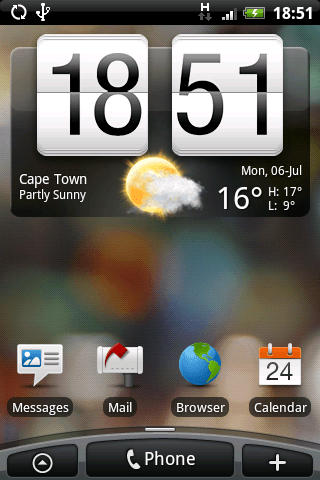
Just a little teaser... I've subsequently installed the Hero ROM... and it is beautiful.
My Magic running Hero with TouchFLO.

This does mean that a relatively unknown manufacturer like Huawei could build a phone to Android specifications, install Android on it and reap the rewards of work that HTC employees had done. Phone manufacturers can chose to keep applications to themselves, like HTC has done with the user interface app called TouchFlo that they released on their new Hero Android phone. However the Open Source license states that if HTC makes any changes to the core Android system (ie, fixing a bug or adding a new feature) those changes have to be shared with the rest of the the Android community.

While all the OHA members, (Google, Intel, Nvidia, HTC, LG, Motorolla, Samsung, Asus, Garmin, Huawei, Sony Ericsson, Toshiba, Acer and more)  work together to build a better phone operating system, there are also a bunch of independent nerds in their nerd rooms building cool apps and fixing bugs for free. (Some developers can charge for their apps)

This is great for the consumer because not only do you get a great operating system and great apps but you also get well priced phones because there is always pressure from the little known phone manufacturers in China etc bringing out a really cheap Android phone. This also means that phone manufacturers can focus on building good quality phones with great cameras etc instead of wasting time with the OS.

While Apple’s iPhone does have a more mature ecosystem, the speed at which Android is currently moving makes me think that their lead will only last for a few more months. Case in point is the ridiculous speed at which new ROMs (A ROM is basically a big file containing the entire operating system) are being released by the Android community. I don’t think I’d be exaggerating if I said there was a new ROM available ever second day.

Which brings me to the part that my nerd friends want to hear about. Running the HERO Rom on my Magic. To clear this up for the non-nerds, what I’m doing here is running an Operating System theoretically built for HTC’s newest phone, the Hero, on my HTC Magic. The fact that this is even possible is entirely due to the fact that these phones run Android. While it may have been possible to do it with other phones in the past, the process would have been exceedingly complicated and probably impossible.

The Process: It was easy, I put the update.zip on my phones’ SD card, booted into fastboot mode, fastbooted the recovery image and applied the update.zip. It took about 2 minutes in total.

The OS: There are a few new things:

  • New keyboard with longpress for things like numbers and symbols ($%#()!) etc. This is great.
  • New Social Networking integration. When you’re setting it up it asks for your twitter, facebook and flickr details. From then on uploading a picture to any of those is a one “click” process. The built in Twitter client, Peep, is pretty nice too.
  • TouchFLO is very pretty but it really needs to be equated to Vista… It is CPU intensive and therefore your battery life is decreased. I used Touch Flo for a few days and then turned it off, which essentially makes the phone look like the traditional Android interface and increase the battery life. TouchFLO does have some nice widgets that are not available once you disable TouchFLO.
  • There are some new non-TouchFLO widgets that come bundled with the image (A neater calendar widget is one) but I think these are probably all available on Android Martket.

Now that I’m back to running the standard Android UI, I do believe that the Hero ROM has increased my battery live compared to the stock image that the phone came with.

All in all I’m very happy with the Hero ROM and I certainly won’t be going back. 😉

j.

HTC Magic – Android Review

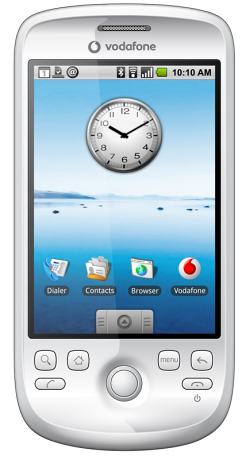
htc-magic-vodafoneI’ve been using an Android phone, the HTC Magic, for about two weeks and I think it’s time to report back.

Build Quality: The phone feels very good, it look slick (at first you’re surprised by how quickly it picks up fingerprints but that isn’t an issue after day 1). It isn’t as solid as an iPhone, but it doesn’t feel like it’ll break easily either.

Voice Quality: Better than my Nokia E61i, better or equal to all the phones I’ve had.

Screen: The screen is nice. The same resolution as the iPhone, just smaller (because the phone is smaller). It certainly is bright enough, I usually have the brightness set to 50%. The image quality is great, better than the iPhone IMHO.

On Screen Keyboard: This is the question most of my nerd friends ask first. When you first get the phone you feel like it’s going to be hard. Coming from the full qwerty on the E61i I was struggling to get up to pace. But it gets better, a lot better. After a while your brain figures out how to thumb the right keys and the Android’s brain figures out what you meant to type. This is like predictive text on steroids… if you’re typing a word but along the way hit a few wrong keys, the phone works out what words you could have meant to type with keys near the ones you pressed. It’s hard to explain but in practice it really does feel a little like magic. So overall the on screen keyboard is actually awesome.

Signal: So far I haven’t had any situations where I’d lost signal while others had signal. The wifi is MUCH better than my E61i.

Connections: The Magic just has one port, a mini usb port. Actually it’s slightly different to mini usb since mini usb fits it but it can also accommodate HTC’s proprietary connector for the headset. I would have loved a regular headphone jack, but they’re trying to keep it minimal. You can get an adaptor. The good news is that the phone charges over usb with a standard mini-usb cable. That in itself is f-ing awesome.

Battery Life: Okay, not great. Look, lets be honest, if you get one of these phones you’re always playing with it… that sucks power. I need to charge this phone every night in order to keep it happy, sometimes more regularly. Happily I usually just plug in into whichever computer I happen to be sitting at and let it charge that way. I’m sure that future androids and future OS improvements will have much better battery life.

General Experience: This phone KILLS anything I’ve ever used before because of the general experience. When you first boot the phone it asks you for a google profile and then from that moment on your phone is perfectly synced with Google Mail, Google Talk, Google Calendars etc. Mail arrives on your phone in seconds and an “@” sign is placed on the notifications bar. From any application you can drag the notification bar down and get a preview of the email and decide whether to read it then of come back to it later. SMS’s, Calendar events, App notifications, like Twitroid saying there are new tweets, etc are all handled by the notification bar.

Evolution: The most awesome thing about this phone is its position in the software evolution. Things are changing all the time. I’m currently running release 1.5 of the Android base system. Since I have already ROM’d and ROOTed my phone I will be trying out the HERO (HTC’s latest Android Phone) ROM, which, while still Android 1.5, comes with a bunch of interface improvements from HTC. Later on this year Google will release the Android Version 2 which no doubt come with a whole whack of ui improvements, stability, batter life etc. The key to me is survival of the fittest. Because the Android development team is far more open than anything else out there, there is a constant source of feedback into the community. I have a long list of suggested improvements that I’m collecting and will publish. It’s not unrealistic to think that the Android devs will read that list and maybe even comment on it.

Openness: Android lets you replace any part of the OS with a replacement part. What that means in general terms is that if I want to phone someone I use the Android default dialer app that ships with the phone. I can replace that app with one that queries an LDAP database over wifi to get all our staff phone numbers. Even the Home application (the one you see when you press the home button) is replaceable.

Just a little teaser... I've subsequently installed the Hero ROM... and it is beautiful.

My Top 11 Android Apps

  1. Android Market – The marketplace has all the apps. Sure you can get a lot of the files in other places, but not as easily as using market
  2. Skymap – Using the compas and the tilt sensor this shows you the stars where the phone is “looking”. It really is quite amazing to see in action.
  3. Timeriffic – A very simple app but amazingly useful. It allows me to change the phone’s volume, brightness, ringtone etc based on certain times. This means my phone automatically gets louder at 8am and softer at 11pm.
  4. ACast – A podcast client in your phone. Can be configured to only download over wifi.
  5. TaskKiller Light – Simple app, lets you kill other apps.
  6. GPS Status – Shows you all the info it can get from the GPS, compass and tilt/motion sensors. ie. Gradient, G forces, GPS Accuracy, How many sattelites it’s using.
  7. CellFinder – Nerdy app, but cool. Shows you where the GSM tower is in relation to your GPS position and shows you how far away etc.
  8. Transdroid – Control your Bittorrent client from your phone.
  9. AndFTP – FTP and SFTP (ssh) client, on your phone. Awesome for grabbing stuff of the network. (Astro is a file browser that supports SMB too)
  10. Twitroid – Fully featured twitter client for your phone.
  11. Google Maps – While it doesn’t have turn based navigation for South Africa yet, it does have all the roads now and can show you your exact location with GPS. This is very cool.

Overall, this phone is amazing, mostly because of Android… I can’t wait to see where Android world goes next.

Rooting a Vodacom HTC Magic and upgrading the firmware in South Africa to get Android Market and more.

If you’re in South Africa and you own an HTC Magic Android phone you’ll soon realise that it’s missing Android Market, which to be honest, is pretty much what makes Android so damn amazing in the first place. In its place is the Leaf Open Market. Leaf are the South African HTC importers. Open Market is about as awesome as getting stabbed in the eye with a pencil, repeatedly. The application works okay, but the selection of applications is incredibly dismal.

Update 30/06/09: There are rumblings that Leaf is going to “release” Market in “two weeks”. Supposedly they’re going to be sending out instructions on how to ROM your phone or allowing you to take it into a vodacom store and getting it ROM’d there (most likely they’ll need to send it away). I have no idea how true these claims are. Maybe someone wants to phone Leaf and ask them?

Update 23/07/09: A really good resource for anyone looking to hack their Magic is the XDA-Developers Forum. Some kind souls have also recently added a Wiki specifically put together for hacking the Magic (Sapphire) which every one of you should read from start to finish.

Anyway, the primary reason I love Android is because it’s hackable. Commence hacking. Warning: Yes, this probably will void your warranty. Yes, it’s possible that the real Android Market will eventually be released in SA, but I’m not holding my breath.

Basically what we’re doing here is updating the phone’s firmware to the version HTC originally intended the Magic to ship with… There are stacks of other firmwares (called ROM’s in the ‘community’) floating around, I’m just pointing to one that definitely works. Using the wrong ROM can put your phone in a state where it refuses to boot… Never fear, see below ‘Recovering from a bricked Magic‘.

General Steps

I’m going to explain the general steps you go through first… This will help you understand what it is you’re about to do so that you aren’t just blindly following instructions.

  1. We get the Android SDK and Fastboot applications installed on our computer
  2. We copy the ROM we want to install onto the SD Card and rename it ‘update.zip’
  3. We boot the phone into FASTBOOT mode.
  4. Using the FASTBOOT program we temporarily upload and ‘install’ the daldroid-recovery.img ROM over USB. (This is a special boot loader app that lets us do cool stuff like made Nandroid backups and install that update.zip ROM from the SD Card.)
  5. The phone boots into the daldroid-recovery mode.
  6. We backup our original ROM to the SD Card using Nandoid, clear some settings and then install the new ROM.
  7. Congratulations, you have a rooted, real android phone 😉

Step by Step Instructions

Okay, now that you know the basic steps, here are the details.

  1. Enable USB debugging on the device in Settings->Applications->Development->”USB Debugging”
  2. Ensure you have the Android SDK downloaded, and the included USB driver installed correctly on your desktop.
  3. Download Fastboot. Since I use linux I just copied the ‘fastboot’ binary to the Android SDK’s tools directory and made it executable.
  4. Open up a terminal/dos prompt and “cd” to the tools directory in your Android SDK folder.
  5. Plug in your USB Cable.
  6. Run the following command:
    adb devices

    Linux users will need to run:

    sudo ./adb devices
  7. You should see your Android phone’s serial in the list. If you get an empty list, you need to sort out your USB driver.
  8. Download Daldroid’s Rooted (adb shell) Original HTC ROM for Magic and Daldroid’s Recovery Image
  9. Unzip the daldroid-recovery.zip file and put it in the Android SDK’s tools directory.
  10. Connect the phone with the USB cable and from the notifications bar, mount the SD card. Rename daldroid-htcmagic1-signed.zip to update.zip and copy it to the phone’s SD card.
  11. On your device, enter the bootloader FASTBOOT mode by turning off the phone and then, while it is off, pressing the volume down button while pressing the power button.
  12. You should get a screen with some androids on skateboards at the bottom…Give it a second to run whatever tests it runs.
  13. Pressing the back button will get you into FASTBOOT MODE and you should see the screen change to say ‘FASTBOOT USB’
  14. Type the following commands on your computer (not on the device):
    fastboot boot daldroid-recovery.img

    Again, Linux users will need to run:

    sudo ./fastboot boot daldroid-recovery.img
  15. This will upload (over usb) a mini recovery image and reboot your phone… It’ll take a few seconds and you’ll be prompted with the recovery interface.
  16. Select ‘Nandroid Backup 2.1’ from the menu. This will write a backup of your existing system to the SD card… useful in case something goes wrong.
  17. Select ‘Wipe Data/factory reset’. This erases settings etc that might not be compatible with the new firmware
  18. Select ‘Apply sdcard:update.zip’. This essentially installs the system image from the update.zip file.
  19. Select ‘reboot system now’.
  20. Wait a long time for the first initialization. Congratulations, you have a real, rooted, Android phone with Android Market and thousands of quality apps to install.

The really nice thing about the Daldroid image is that it comes with all the APN settings etc required for Vodacom so your HSDPA will work straight away.

Recovering from a ‘Bricked’ Magic

I promised earlier I would tell you how to recover from a ‘Bricked’ Android phone… I’ve put ‘bricked’ in quotes because a lot of people seem to be thinking they’ve bricked their phones when in reality it’s quite easy to recover.

  1. Check if you can get to into Fastboot Mode:
    1. Remove the battery.
    2. Wait 10 seconds (or more)
    3. While pressing the volume down button, pop the battery back in.
    4. If it doesn’t turn on by itself, keep pressing the volume down button and press the power button.
    5. You should get the Fastboot menu.
    6. If you don’t get into Fastboot mode, try a few more times and then panic. I don’t know how to help you. Try Google.
  2. You now need to copy the right update.zip (see step 8 above) onto your SD Card. There are two ways:
    1. Get a usb card reader or use another cell phone that will allow you to mount the SD Card over USB and just copy it.
    2. or, the slightly fancier way, while your phone is in Fastboot mode run the following command on your computer (first put the new update.zip in your Android SDK tools directory):
      adb push update.zip /sdcard/update.zip

      Again, Linux users will need to run:

      sudo ./adb push update.zip /sdcard/update.zip

      This uploads the file directly onto the SD Card via USB. It takes a minute or two so do be patient.

  3. Now you just need to follow steps 11 though 20 from the instructions above and you should be golden.

Updated (21 June 2009) – Putting the original Vodacom ROM back

If for some or other reason you want to go back to the old version of the Vodacom ROM, you can do so quite easily.

Nandroid writes a selection of files to the SD Card:

2.5M  boot.img
339K  cache.img
60M   data.img
256K  misc.img
265    nandroid.md5
5.0M  recovery.img
78M   system.img

You should really make a copy of them on your local machine just in case. Once you’ve got those files on your local machine you can restore your phone using fastboot like so:

  1. Copy the nandroid files (*.img) from your backup into your SDK Tools Directory.
  2. Boot your phone into Fastboot mode (Steps 11, 12, 13) from the Step by Step guide above.
  3. Run the following commands from your computer:
    fastboot erase system -w
    fastboot erase boot
    fastboot flash system system.img
    fastboot flash userdata data.img
    fastboot flash boot boot.img
    fastboot reboot
  4. Congratulations, you now have your old Vodacom phone back. :/

Hope this helps, feel free to ask questions.

Let The Police Eat Cake

A few months ago we had some hassles in Obs with criminals stealing car wheels. Eventually it was happening almost nightly. The Neighbourhood Watch (I’m a member, how responsible of me!) started ramping up their patrolling and putting pressure on the police to catch the guys. Within a few days a sharp eyed policeman spotted something trying to hide next to a car with a wheel spanner in his hand. Within minutes they had 4 guys in custody… I was out on a patrol at the time, ironically one road up from where the guys were eventually caught. That night at the Woodstock police station I promised to organise some cake for the police to say thanks.

I pinged a few of the more active neighbourhood watchers and a few agreed to help out financially… Then I though about Charly’s! If you want awesome cake you have to go to Charly’s, but it’s not cheap. I mailed Charly’s and asked if they’d be willing to give us a discount for a good cause. To my surprise they said they’d give us cake for free!  This was brilliant. We used the additional funds to buy other stuff like samoosas and coke etc. To our absolute surprise, when we went to go and collect the cake they had even decorated each one with a police theme!

All in all a nice little party (we actually had two parties to cover both shifts). A big thank you to Charly’s and the other ONW members who helped out.

cake_burglerP4160050cake_detail

More Before and Afters

Since we moved in we’d been wanting to buy one of those pine workbenches they sell at places like builders warehouse and do it up for the kitchen. We decided on painting the base in white enamel and staining and varnishing the top.

As you can see, before:
Before

After:
After

I’m quite happy with the difference, it’s made the kitchen feel far more structured.